"Free" online tools still cost money to run — servers, bandwidth, and processing power aren't free for whoever operates the site. That cost gets covered somehow, and it's worth understanding the general options rather than assuming the worst (or the best) about any specific tool without checking.
How free tools typically fund themselves
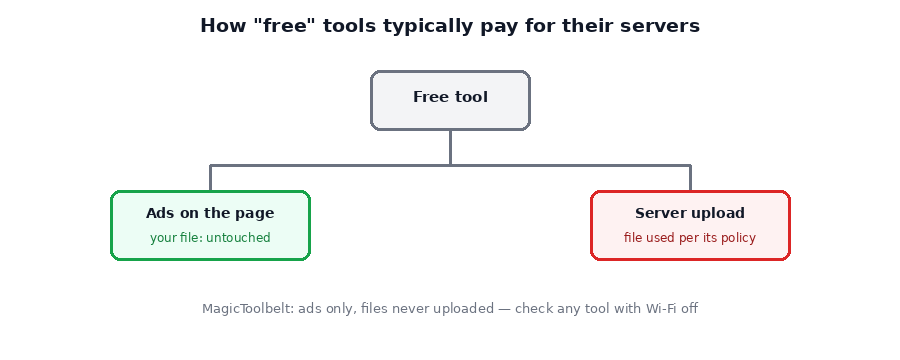
The most common model is straightforward: ads on the page, same as most free websites. Some tools also offer a paid tier with fewer limits, subsidizing the free version. A smaller number monetize by using uploaded files or usage data in ways described (sometimes vaguely) in a privacy policy — for training data, aggregated analytics, or other purposes beyond just completing your requested task.
Why "it's free so it must be selling my data" isn't a fair assumption
It's tempting to assume the worst about any free service, but that's not accurate or fair without evidence. Plenty of free tools are funded entirely by ads and don't do anything unusual with your files. The honest answer is: you can't know just from a tool being free — you have to check what a specific site actually states and does.
What's actually worth checking
- Does it process your file locally, or upload it? Disconnect your Wi-Fi after the page loads and try running the tool — if it still works, nothing was sent anywhere.
- If it does upload, what does the privacy policy say? Look specifically for a stated retention period (how long files are kept) and a statement that files aren't used for purposes beyond the task you asked for.
- Is the privacy policy vague or specific? A policy that clearly states "files are deleted after processing" is a stronger signal than one that says nothing at all about retention.
The tradeoff you can sidestep entirely
If a tool processes your file entirely in your browser instead of uploading it, the whole question becomes moot — there's no server-side copy to retain, log, or use for anything, because the file never left your device in the first place. That's the model every tool on MagicToolbelt uses, funded by ads on the page rather than anything involving your files.
→ Browse all MagicToolbelt tools — every one runs in your browser, nothing is uploaded.Frequently asked questions
Does "free" mean a tool is selling my files?
Not necessarily, and it's not fair to assume so without evidence. But "free" does mean the service is funded somehow — usually ads, and sometimes by processing files on a server where they're at least temporarily accessible. What a specific site actually does should be checked in its own privacy policy, not assumed.
What should I actually check before uploading a file to an online tool?
Whether the tool processes files locally in your browser or uploads them to a server (test by disconnecting Wi-Fi and trying it), and if it does upload, whether the privacy policy states a retention period and states files aren't used for anything beyond the requested task.
Is a paid tool automatically safer than a free one?
Not automatically — paying doesn't guarantee a stated retention policy or client-side processing either. The actual safeguard is checking how the specific tool handles files, regardless of price.
How does MagicToolbelt make money if it doesn't upload files?
Through ads on the page, the same as most free tools — the difference is the files themselves never leave your device, so there's nothing to collect even if the business wanted to.
Want the fuller technical picture of how local processing works? Our guide to browser-based vs. server-upload tools covers the mechanics in more depth.
Curious what happens with your own files? Try any MagicToolbelt tool with your Wi-Fi off and see for yourself.